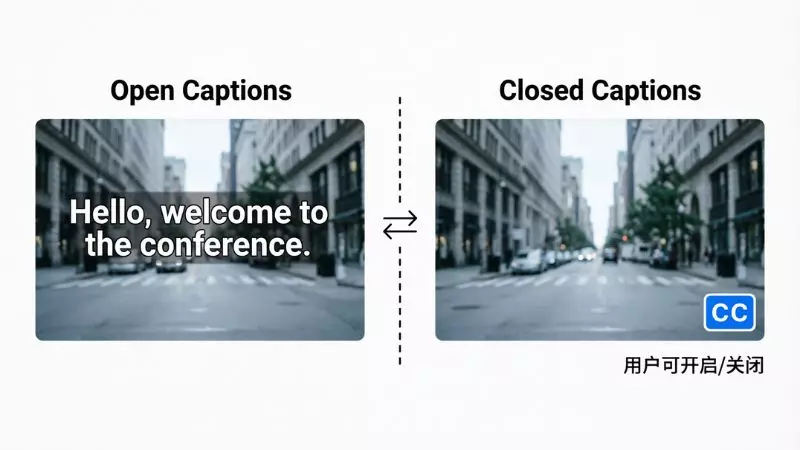
Open vs closed captions is a common topic for creators, marketers, and video publishers who want better accessibility and higher engagement. Many users search for the difference between open captions and closed captions, especially when optimizing videos for SEO, user experience, and social media platforms.
Understanding how captions work can improve video reach, boost watch time, and help target audiences who prefer subtitles for videos.
When comparing open captions vs closed captions, it is important to consider accessibility for the deaf and hard of hearing, video SEO optimization, and platform compatibility.
Open captions are always visible on screen, while closed captions can be turned on or off by the viewer. Choosing the right caption type can increase video discoverability, improve audience retention, and support multilingual subtitle strategies for global content creators.
Open Captions vs Closed Captions

If you are trying to understand open captions vs closed captions, think of it as control vs visibility. Both are types of video text overlays, but they serve slightly different purposes in accessibility, user experience, and video SEO optimization. Many creators now use captions to improve watch time, reach silent viewers, and rank videos for long tail search queries like “best caption type for social media videos” or “how captions improve video engagement”.
Key differences explained simply:
- Open captions are permanently visible and cannot be turned off
- Closed captions can be enabled or disabled by the viewer
- Open captions are ideal for autoplay platforms like social media feeds
- Closed captions are better for streaming platforms and accessibility settings
| Feature | Open Captions | Closed Captions |
| User Control | No control | Full control |
| Visibility | Always on screen | Optional |
| SEO Impact | Helps engagement | Helps accessibility indexing |
| Platform Use | Social media, ads | Netflix, YouTube, TV |
What is Open Caption in a Movie Theater
Open caption in a movie theater refers to captions that are displayed directly on the cinema screen for everyone to see. Unlike personal caption devices, these captions are embedded into the film and cannot be turned off. This is especially helpful for deaf and hard of hearing audiences and viewers who prefer reading dialogue for clarity.
As a viewer, you do not need to request anything special. You simply choose a screening labeled “open caption screening” or “OC showing”.
Why movie theaters use open captions:
- Improves accessibility for all audiences
- Helps non-native English speakers understand dialogue
- Useful in noisy environments or complex sound scenes
- Growing demand due to inclusive cinema experiences
When to choose open caption screenings:
- If you prefer subtitles always visible
- If you struggle with fast or unclear dialogue
- If you want a more inclusive viewing experience
Open Captions vs Closed Captions Movies
When comparing open captions vs closed captions movies, the main difference is how the captions are delivered to the audience. This becomes important when choosing how to watch films in theaters or streaming platforms.
Open caption movies:
- Captions are displayed on the main screen
- Everyone in the theater sees them
- No special device required
Closed caption movies:
- Captions are accessed through personal devices
- Devices may include caption glasses or seat-mounted screens
- Not visible to others in the theater
| Aspect | Open Caption Movies | Closed Caption Movies |
| Equipment Needed | None | Special device |
| Audience Visibility | Shared | Individual |
| Ease of Use | Very easy | Requires setup |
| Accessibility Level | High | High but device-dependent |
Open Captions vs Closed Captions Movie Theater

In a movie theater setting, the choice between open captions vs closed captions depends on user comfort, theater availability, and accessibility needs. Modern cinemas are now offering both options to improve inclusive entertainment.
Open caption theaters:
- Scheduled screenings with captions on screen
- No setup required
- Ideal for group viewing
Closed caption theaters:
- Provide assistive devices
- Viewers can turn captions on or off
- More flexible but less convenient
Quick comparison for moviegoers:
- Choose open captions for simplicity and clarity
- Choose closed captions if you want a private viewing experience
This topic is gaining popularity in search with queries like “accessible movie theaters with captions” and “which caption option is best in cinema”.
Closed Caption vs Subtitles
Closed caption vs subtitles is another important comparison, especially for video creators and streaming platforms. While many people think they are the same, they actually serve different purposes in content accessibility and localization.
Closed captions include:
- Dialogue text
- Background sounds like music or laughter
- Speaker identification
Subtitles include:
- Only spoken dialogue
- Usually used for translation
- Designed for viewers who understand audio but need language support
| Feature | Closed Captions | Subtitles |
| Audio Description | Yes | No |
| Language Support | Same language | Often translated |
| Accessibility Use | High | Medium |
| SEO Benefit | Strong | Moderate |
Best use cases:
- Use closed captions for accessibility compliance and inclusive content
- Use subtitles for multilingual audiences and global reach
Open Caption vs Closed Caption AMC
If you are watching movies at AMC Theatres, understanding open caption vs closed caption AMC options can improve your overall cinema experience. AMC offers both formats to support accessibility and viewer preference, especially for audiences searching for “captioned movie screenings near me” or “accessible cinema options with subtitles”.
Open caption at AMC means:
- Captions are displayed directly on the main screen
- Everyone in the theater sees the text
- No device or setup is required
Closed caption at AMC means:
- Captions are delivered through personal devices
- Devices include caption glasses or seat-mounted screens
- Only the user can see the captions
| Feature | Open Caption AMC | Closed Caption AMC |
| Visibility | On main screen | Personal device |
| Ease of Use | Very simple | Requires setup |
| Audience | Shared viewing | Individual viewing |
| Accessibility | Immediate | Device dependent |
AMC usually labels showtimes as “Open Caption” or “Closed Caption Available”, so always check before booking to match your preference.
Is Open Caption Subtitles
A common question is whether open captions are the same as subtitles. The answer is not exactly, even though they may look similar on screen. Open captions and subtitles both display text, but they serve different purposes in accessibility and content delivery.
Open captions include:
- Spoken dialogue
- Background sounds such as music or effects
- Speaker identification
Subtitles usually include:
- Only spoken dialogue
- Translation for different languages
- No sound descriptions
Simple understanding:
- Open captions are designed for accessibility
- Subtitles are designed for language support
Open Caption On Screen Subtitles AMC

When you see “open caption on screen subtitles AMC”, it means the movie will display captions directly on the cinema screen for the entire audience. This format is becoming more popular due to increasing demand for inclusive viewing and better comprehension.
What to expect in AMC open caption screenings:
- Text appears at the bottom of the screen
- Includes dialogue and sound cues
- No need for any assistive device
- Same experience for all viewers
Why viewers prefer this option:
- Easier to follow fast or unclear dialogue
- Helpful for non-native English speakers
- No technical issues like device malfunction
What is Closed Caption in a Movie Theater
Closed caption in a movie theater refers to captions that are not visible on the main screen but can be accessed through a personal device. This system is designed to provide accessibility without affecting other viewers.
How closed captions work in theaters:
- You request a device at the ticket counter
- The device syncs with the movie
- Captions are displayed privately
Types of closed caption devices:
- Caption glasses
- Seat-mounted caption screens
- Handheld display devices
| Feature | Closed Caption Theater Experience |
| Visibility | Private only |
| Setup | Required |
| Flexibility | Can turn on or off |
| Accessibility | High but device reliant |
This option is widely used in cinemas that aim to provide inclusive services while maintaining a standard viewing experience for all audiences.
Open Captions vs Closed Captions Movie Theater
Choosing between open captions vs closed captions movie theater options depends on your personal preference and comfort level. Both serve accessibility needs, but the experience is different.
Open captions are best if:
- You want captions always visible
- You do not want to use any device
- You prefer a shared viewing experience
Closed captions are best if:
- You want control over captions
- You prefer a private display
- You do not want text on the main screen
Quick comparison for decision making:
| Factor | Open Captions | Closed Captions |
| Convenience | Very high | Medium |
| Privacy | Low | High |
| Setup Required | No | Yes |
| Viewing Comfort | Depends on preference | Customizable |
Open Captions vs Closed Captions vs Subtitles
Understanding open captions vs closed captions vs subtitles is essential if you want to improve accessibility, video SEO, and audience engagement. These three formats may look similar, but they serve different purposes in content consumption, especially for users searching long tail queries like “difference between captions and subtitles for videos” or “which caption type is best for accessibility”.
Open captions:
- Always visible on screen
- Cannot be turned off
- Include dialogue and sound descriptions
Closed captions:
- Can be turned on or off
- Include dialogue, sound effects, and speaker labels
- Common on streaming platforms and TV
Subtitles:
- Focus only on spoken dialogue
- Often used for translation into another language
- Do not include sound cues
| Feature | Open Captions | Closed Captions | Subtitles |
| User Control | No | Yes | Yes |
| Audio Descriptions | Yes | Yes | No |
| Language Support | Same language | Same language | Often translated |
| Best Use Case | Social media, cinemas | Streaming, TV | Global audience |
Pro tip for creators:
Use closed captions for accessibility compliance, subtitles for multilingual SEO targeting, and open captions for higher engagement on autoplay videos.
Open Captions vs Closed Captions Cinema

When comparing open captions vs closed captions cinema options, the main difference lies in how captions are delivered during a movie screening. This is important for users searching phrases like “cinema with captions on screen” or “accessible movie theaters with caption options”.
Open captions in cinema:
- Displayed directly on the main movie screen
- Visible to everyone in the theater
- No device or setup needed
Closed captions in cinema:
- Provided through personal devices
- Devices may include caption glasses or seat displays
- Only visible to the individual user
Why cinemas offer both:
- To support accessibility for deaf and hard of hearing audiences
- To give viewers flexibility and control
- To improve overall movie experience for diverse audiences
| Aspect | Open Captions Cinema | Closed Captions Cinema |
| Visibility | Public | Private |
| Setup | None | Required |
| Ease of Use | Very easy | Slightly complex |
| User Preference | Shared viewing | Personal viewing |
Closed Captions vs Open Captions in Theatre
Closed captions vs open captions in theatre is a practical comparison that helps moviegoers choose the best viewing experience based on comfort and accessibility needs. Modern theaters are increasingly offering both options to meet growing demand for inclusive entertainment.
Closed captions in theatre:
- Ideal for viewers who want privacy
- Can be turned on or off anytime
- Requires a compatible device
Open captions in theatre:
- Ideal for viewers who prefer simplicity
- No technical setup required
- Everyone sees the captions on screen
Which one should you choose:
- Choose open captions if you want a hassle free and clear experience
- Choose closed captions if you prefer control and a distraction free screen
| Decision Factor | Open Captions | Closed Captions |
| Convenience | High | Medium |
| Customization | Low | High |
| Accessibility | Strong | Strong |
| Viewing Style | Shared | Individual |
Closed Captions vs Captions
Many people use the terms interchangeably, but there is a subtle difference between closed captions vs captions that matters for accessibility and SEO. “Captions” is a broad term that includes both open captions and closed captions, while “closed captions” is a specific type with user control.
Captions (general term):
- Refers to any on screen text that represents audio
- Includes both open captions and closed captions
- Used in videos, social media, and streaming
Closed captions (specific type):
- Can be turned on or off by the viewer
- Include dialogue, sound effects, and speaker identification
- Designed for accessibility and compliance
Quick clarity:
- All closed captions are captions
- Not all captions are closed captions
| Feature | Captions (General) | Closed Captions |
| Scope | Broad category | Specific format |
| Control | Depends | User controlled |
| Accessibility | Varies | High |
| SEO Value | Good | Strong |
Closed vs Open Captions
Closed vs open captions is one of the most searched comparisons in video accessibility and content creation. The main difference is whether the viewer has control over the captions.
Open captions:
- Always visible on screen
- Cannot be turned off
- Ideal for autoplay videos and social media
Closed captions:
- Optional and user controlled
- Can be enabled or disabled
- Common on streaming platforms and websites
When to use each:
- Use open captions for higher engagement on platforms like Instagram or Facebook
- Use closed captions for accessibility compliance and better user control
| Feature | Open Captions | Closed Captions |
| Visibility | Always on | Optional |
| User Control | No | Yes |
| Best Use | Social media | Streaming platforms |
| Accessibility | Strong | Strong |
What is the Difference Between Captions and Closed Captions
The difference between captions and closed captions comes down to definition and functionality. Captions is an umbrella term, while closed captions is a specific implementation designed for accessibility.
Captions:
- Any text that represents spoken or audio content
- Can be open or closed
- Used across video platforms
Closed captions:
- A type of caption that can be turned on or off
- Includes detailed audio cues like music and background sounds
- Often required for accessibility standards
Simple explanation:
- Captions = category
- Closed captions = feature within that category
| Element | Captions | Closed Captions |
| Definition | General term | Specific type |
| Flexibility | Varies | High |
| Accessibility Features | Limited or full | Full |
| Control | Depends | Always user controlled |
Closed Captions on Instagram
Closed captions on Instagram are becoming essential for creators who want better reach, engagement, and accessibility. Since many users watch videos without sound, captions significantly improve watch time and retention.
How closed captions work on Instagram:
- Auto generated captions are available in some regions
- You can manually add captions while editing videos
- Viewers can turn captions on or off depending on settings
Benefits of using captions on Instagram:
- Improves video engagement and watch duration
- Helps reach users watching without sound
- Supports accessibility for hearing impaired audiences
- Boosts discoverability with keyword rich text
Best practices for Instagram captions:
- Use clear and simple language
- Add relevant keywords naturally
- Sync captions accurately with speech
- Avoid cluttering the screen with too much text
| Factor | Impact of Closed Captions on Instagram |
| Engagement | Higher |
| Watch Time | Increased |
| Accessibility | Improved |
| SEO Visibility | Stronger |
Frequently Asked Questions
What is the difference between open vs closed captions?
Open captions are always visible on screen, while closed captions can be turned on or off by the viewer for better accessibility and user control.
Which is better open vs closed captions for accessibility?
Closed captions are better for accessibility compliance, while open captions improve instant readability for users watching videos without sound.
Are open captions the same as subtitles?
No, open captions include dialogue and sound cues, while subtitles usually focus only on spoken words or translation.
When should you use open vs closed captions in videos?
Use open captions for social media engagement and silent autoplay, and closed captions for streaming platforms and user controlled viewing.
Do open captions help video SEO and engagement?
Yes, open captions improve watch time, reduce bounce rate, and support keyword visibility in video content optimization.
Can viewers turn off open vs closed captions?
Viewers cannot turn off open captions, but closed captions offer full control to enable or disable based on preference.
What are closed captions in movie theaters?
Closed captions in theaters are delivered through personal devices, allowing private viewing without displaying text on the main screen.
Why are open vs closed captions important for content creators?
They enhance accessibility, improve audience retention, and help rank for long tail keywords like video caption optimization and inclusive content strategies.
Final Words
Understanding Open vs Closed Captions is essential for anyone working in video content, digital marketing, or online streaming. Both caption types play a key role in improving accessibility, user engagement, and overall viewing experience across platforms.
Choosing between Open vs Closed Captions depends on your audience needs, platform requirements, and content goals. Open captions are ideal for visibility and engagement, while closed captions offer flexibility and control. Using the right caption strategy can boost SEO performance, increase watch time, and help your content reach a wider global audience.

Hey there! I’m Sophie Lane, the creative mind behind CaptionRizz.com — your go-to space for everything witty, flirty, and full of charm. I’ve always believed that the right words can make anyone stand out — whether it’s a catchy Instagram caption, a smooth pick-up line, or the perfect rizz to impress someone special.
At CaptionRizz, my goal is simple: to help you express your mood, your style, and your personality through clever lines that grab attention. From romantic captions to bold one-liners, every piece is designed to make your words unforgettable.
I spend hours crafting original content that blends humor, confidence, and creativity — perfect for anyone who wants to upgrade their caption game or learn the art of modern “rizz talk.”
So whether you’re posting a photo, sliding into DMs, or just looking for that one perfect line — I’ve got you covered.
Let your words shine. Let your vibe speak.Welcome to CaptionRizz — where captions meet confidence. 💬✨